
 Account

Introducing ProtoPie AI (Beta): Build Smarter Interactions Faster Without Losing Control
POSTED 11th OF Feb, 2026, Posted by Summer Magdaraog

POSTED 11th OF Feb, 2026, Posted by Summer Magdaraog

ProtoPie AI is now available in open beta starting February 9, 2026, for Basic, Pro, and Enterprise users bringing AI-assisted interaction design directly into ProtoPie Studio.
Unlike typical AI prototyping tools that help you start fast but struggle when it’s time to refine, ProtoPie AI is designed for teams that need speed and precision. It helps you generate complex interaction logic using natural language then gives you full control to edit, refine, and scale those interactions into high-fidelity, test-ready prototypes.
As an authorized ProtoPie reseller, we work closely with teams evaluating ProtoPie AI for real production workflows from early UX exploration to enterprise-grade user testing.
ProtoPie AI is an AI-powered interaction design assistant built directly into ProtoPie Studio.
It allows designers, product teams, and UX professionals to:
Most importantly, nothing is locked. Every AI-generated interaction uses ProtoPie’s native interaction system, so you can refine it exactly as if you built it manually.
This makes ProtoPie AI fundamentally different from AI tools that only generate screens or static transitions.
If you’ve tried AI prototyping tools before, this might sound familiar:
That’s because many AI tools optimize for output speed, not interaction depth.
ProtoPie AI was built to solve this exact problem.
Instead of producing black-box results, it generates fully transparent interaction logic so as your prototype increases in fidelity or complexity, nothing needs to be thrown away or recreated.
ProtoPie AI removes the trade-off between speed and control.
Rather than sitting on top of ProtoPie as a separate AI layer, it’s integrated directly into ProtoPie’s interaction engine. Every AI-generated interaction is built using the same trigger-and-response logic you already know.
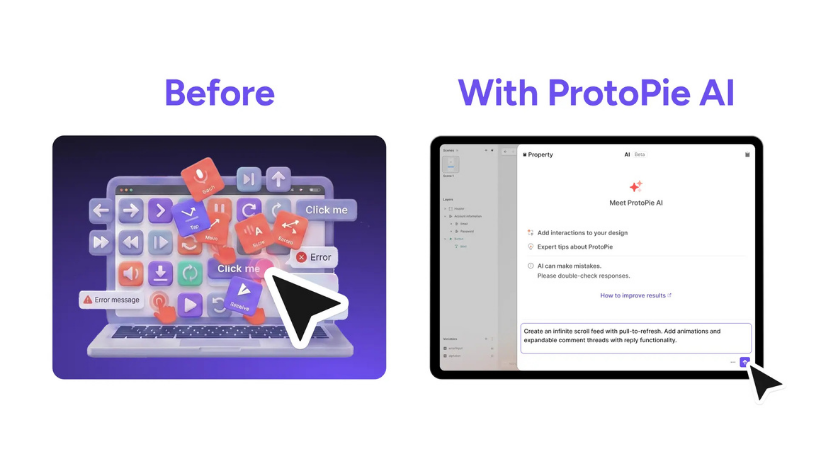
Before ProtoPie AI
With ProtoPie AI
You describe:
“Create an infinite scroll feed with pull-to-refresh, animated loading states, and expandable comment threads with replies.”
ProtoPie AI generates the full interaction structure in minutes. From there, you fine-tune scroll physics, animation timing, and micro-interactions the details that make a prototype feel real.
You see everything:
And you can edit any part of it at any time.
Every prototyping tool has a learning curve. ProtoPie AI shortens it dramatically.
Instead of searching documentation or guessing which interaction setup works best, you can simply describe what you want:
“When email verification fails, shake the input field and show an error message.”
ProtoPie AI translates that request into a visible interaction structure helping you understand how it works as it builds.
ProtoPie AI also answers questions about:
The result: faster prototyping cycles, earlier user testing, and less friction between design and development.
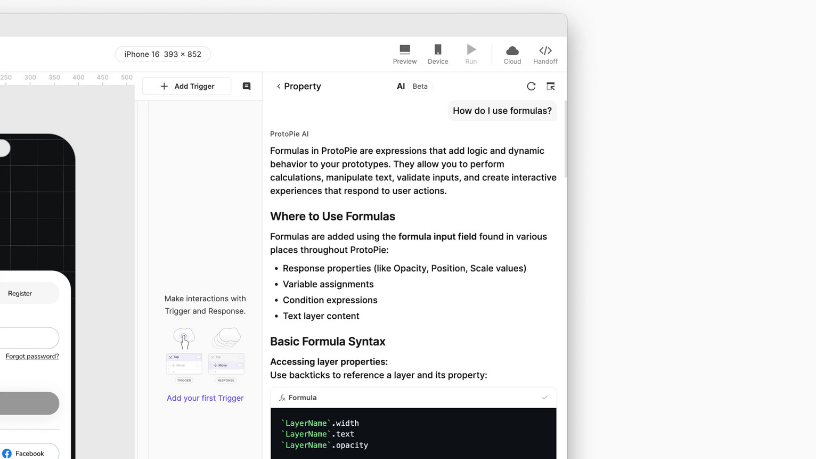
ProtoPie AI Planning & Docs feature answering formula questions
Complex interaction setup is necessary but it’s rarely where design teams create the most value.
ProtoPie AI automates this groundwork so teams can focus on experience quality, not repetitive configuration.
Manual setup
That’s hours of interaction wiring.
With ProtoPie AI
You describe the flow once. ProtoPie AI generates the complete interaction logic including conditions and transitions. Designers then refine messaging, animations, and edge cases for realistic testing.
Business impact
ProtoPie AI was designed with enterprise requirements in mind from day one.
Security, control, and trust are not add-ons; they are built into the system.
Many AI tools hit a ceiling:
ProtoPie AI is different.
It generates interaction logic you can see, edit, and scale from simple tap interactions to advanced multi-scene flows with variables, sensors, and conditional branching.
You get:
This is AI designed for high-fidelity prototyping, not just fast mockups.
ProtoPie AI is launching in open beta, with ongoing improvements based on real-world usage and feedback.
ProtoPie AI represents a shift toward better prototyping at scale, not just faster output, but prototypes that are realistic, test-ready, and production-relevant.
If you’re evaluating AI-powered prototyping tools or exploring how ProtoPie AI fits into your workflow, our team can:
Reach out to us to experience ProtoPie AI in action and see how it can elevate your interaction design workflow.
Share: