
 Account

Boris FX Continuum 2026.5 Brings Smarter AI and Faster VFX Workflows
POSTED 15th OF May, 2026, Posted by Summer Magdaraog

POSTED 15th OF May, 2026, Posted by Summer Magdaraog

Boris FX has released Continuum 2026.5, introducing workflow-focused updates across AI tools, compositing controls, transitions, distortion effects, and Particle Illusion.
Instead of positioning AI as a replacement for creative work, the release focuses on reducing repetitive production tasks like restoring interlaced footage, isolating effects, managing GPU memory, and building stylized distortions more efficiently.
For editors, compositors, and motion designers working under tight deadlines, Continuum 2026.5 is less about headline AI features and more about improving everyday post-production workflows.
As an authorized reseller, Motion Media reviewed the update to highlight the changes most relevant to production teams and creative professionals.
One of the biggest additions in Continuum 2026.5 is BCC+ Deinterlace ML, a new machine learning-powered effect designed to convert interlaced footage into progressive-scan frames automatically.
The tool is built for workflows involving:
Traditional deinterlacing methods can introduce softness, ghosting, or visible artifacts. Boris FX designed the new ML-assisted workflow to preserve more image detail while improving frame reconstruction during restoration.
For teams regularly handling archive or interlaced footage, this may become one of the most practical additions in the release.
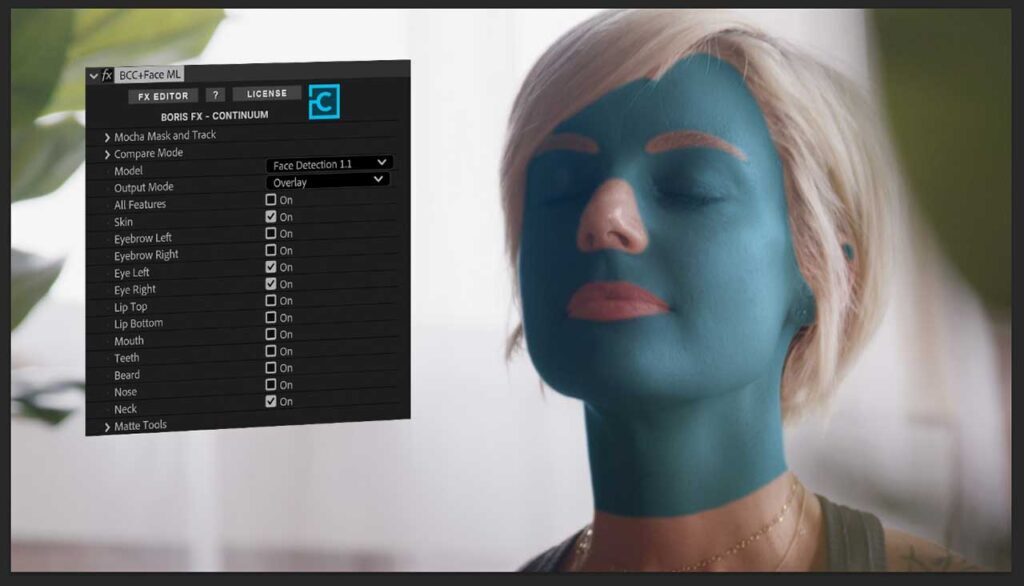
Boris FX Continuum 2026.5: New nose and neck segmentation in Face ML (AI)
Continuum 2026.5 also updates several existing AI-assisted tools with improved accuracy and expanded capabilities.
Updated tools include:
Face ML now includes additional segmentation controls for the nose and neck, allowing more precise masking for grading, cleanup, retouching, and stylized effects work.
This helps reduce manual masking adjustments when isolating facial regions.
Motion Blur ML now supports prismatic colored blur trails for more stylized motion effects.
The feature is suited for creative workflows such as:
Continuum 2026.5 introduces a new ML/AI model unload system that automatically removes inactive AI models from GPU memory after periods of inactivity.
When the effect is needed again, the model reloads automatically.
This improvement is designed to help reduce GPU memory usage in heavier timelines, especially when working with multiple AI-assisted effects simultaneously inside applications like:

Boris FX Continuum 2026.5: Pixel Chooser integration in the FX Editor
The Continuum FX Editor receives several workflow-focused updates in version 2026.5.
The new integrated Pixel Chooser allows artists to isolate effects directly inside a single layer using:
This reduces the need for additional compositing layers or complicated masking setups.
Continuum also adds a new Color Management Panel with:
The update is designed to help maintain more consistent color workflows across host applications.
An updated Info Panel now displays live RGBA and pixel position readouts for more accurate effect evaluation and color adjustments.
Several effects inside the Warp category have been significantly expanded in Continuum 2026.5.
Updated effects include:
New additions include:

Boris FX Continuum 2026.5: Updated Ripple Effect
BCC+ Ripple now supports:
These additions make it easier to create layered distortion effects and stylized motion graphics without building complex setups manually.
Continuum 2026.5 also updates:
The transitions now include gradient-driven controls that allow editors to guide wipe direction, focus, and motion more naturally.
The goal is to create transitions that feel more integrated into the edit rather than relying on basic linear wipes.
Title Studio receives:
Beat Reactor is now integrated into additional effects including:
This allows more effects to react automatically to audio input directly inside Continuum.

Boris FX Continuum 2026.5: Updated Displacement Effects
Particle Illusion also receives several workflow-focused updates in Continuum 2026.5.
New additions include:
The new color mapping tools support:
These controls make it easier to create more controlled and consistent particle behavior across complex setups.

Boris FX Continuum 2026.5: New parameter linking in Particle Illusion
Continuum 2026.5 supports major editing, compositing, and finishing applications including:
Many AI-focused software releases prioritize automation headlines. Continuum 2026.5 takes a more workflow-driven approach.
The update focuses on:
Rather than replacing creative workflows, most of the new features are designed to reduce technical overhead and speed up production tasks.
For editors, compositors, and motion designers balancing quality and turnaround time, those practical improvements may be the most important part of the release.
Looking to upgrade to Continuum 2026.5 or expand your Boris FX toolkit?
Motion Media is an authorized reseller of Boris FX software, including:
Whether you need a new subscription, perpetual license, renewal, or upgrade plan, our team can help you find the right licensing option for your production workflow.
Explore available products and licensing options in the Motion Media Boris FX Store.
Share: