
 Account

Fix Bad Audio Fast with CrumplePop Voice Enhance – Tutorial by Nick Harauz
POSTED 14th OF May, 2025, Posted by Summer

POSTED 14th OF May, 2025, Posted by Summer

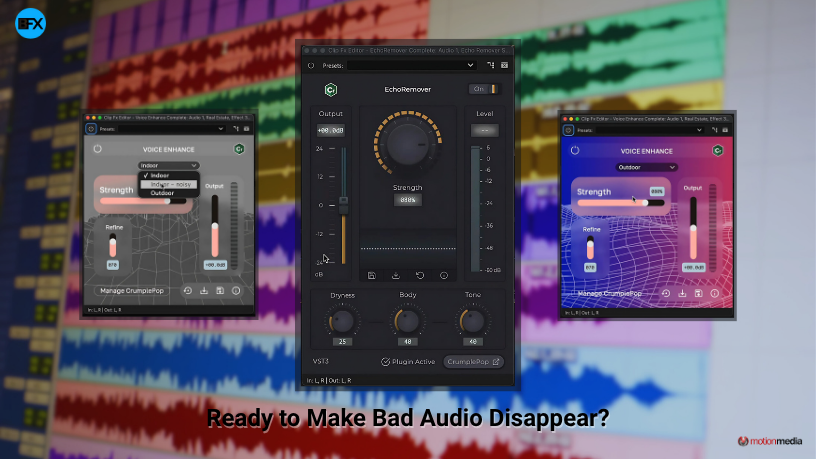
Struggling with bad audio in your video projects? Whether you're dealing with background noise, echo, or low-quality voice recordings, CrumplePop’s Voice Enhance plugin offers a fast, AI-powered solution. In this tutorial, video expert Nick Harauz walks you through how to clean up difficult audio using Voice Enhance and other CrumplePop audio restoration tools—right inside your favorite editing software.
Voice Enhance is an AI-driven audio plugin designed to fix challenging voice recordings with a single click. Built for creators who need quick, professional-quality results, it can remove noise, reduce reverb, and improve clarity—even from phone-recorded audio or echoey rooms.
Nick demonstrates how to integrate Voice Enhance into different workflows. Whether you're editing a podcast, YouTube video, or corporate interview, the plugin adapts to your needs across multiple platforms.
Voice Enhance comes with three optimized AI models, each tuned for different audio scenarios:
Learn how to choose the right model to get the cleanest possible sound from your raw recordings.
Bad audio often has more than one problem. That’s why Nick also explores how to use Voice Enhance alongside other CrumplePop tools like:
Stacking these plugins can dramatically improve audio quality—even in the most challenging conditions.
Voice Enhance and CrumplePop plugins support industry-standard software including:
No matter your editing platform, you can use CrumplePop to fix bad audio fast and professionally.
Want to see it in action? Watch Nick Harauz’s full walkthrough to learn how to use Voice Enhance and elevate your audio fast—whether you're working on a rough phone recording or cleaning up echo from a large room.
Try CrumplePop Voice Enhance Today and clean up your audio like a pro.
Share: