
 Account

Sequoia 2026.5 Adds Spatial Panner and New Workflow Improvements
POSTED 10th OF Aug, 2026, Posted by Summer Magdaraog

POSTED 10th OF Aug, 2026, Posted by Summer Magdaraog

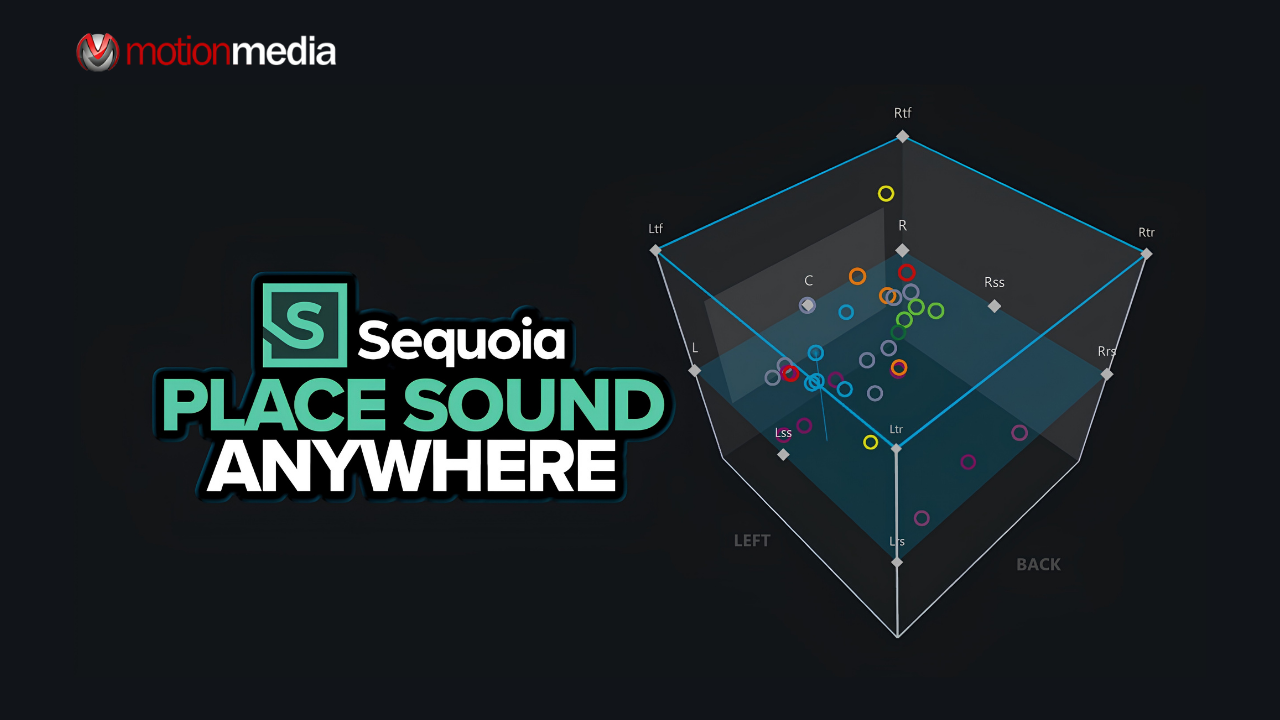
Boris FX has released Sequoia 2026.5, bringing a new Spatial Panner alongside improvements to immersive mixing, video workflows, audio plugins, ARA integration, editing, and mastering.
The update’s main feature is the Spatial Panner, a visual workspace for positioning audio sources across stereo, surround, 22.2, Dolby Atmos, and ADM formats. Sequoia 2026.5 also adds SoundApp ARA for AI-powered stem separation and denoising, expands ARA2 support, improves Blackmagic hardware compatibility, and introduces several smaller workflow and export enhancements.
The Sequoia 2026.5 update includes:
The biggest addition in Sequoia 2026.5 is the new Spatial Panner, which gives users a visual way to position and manage audio sources in three-dimensional space.
Rather than using separate panning workflows for different formats, users can work with stereo, surround, and immersive mixes within the same environment.
The Spatial Panner supports configurations from mono through 22.2 channels, Dolby Atmos, and ADM, making it useful for projects that need to move between different spatial audio formats.
The Spatial Panner provides a 3D cube view showing the positions of routed sources within the virtual space.
Users can view one or multiple tracks simultaneously and use color coding to make larger sessions easier to navigate. Peak meters and source management controls provide additional information while working with complex spatial mixes.
This gives mixers a clearer view of how individual sources relate to one another across the entire spatial environment.
Sequoia 2026.5 can also help simplify projects that require multiple delivery formats.
Users can create stereo and immersive versions from the same project while preserving the existing stereo mix. Panning can be linked across multiple target buses, allowing changes to be applied across stereo, surround, and immersive mixes simultaneously.
Individual formats can still be adjusted when a particular delivery requires different positioning.
For projects that need several versions of the same mix, this can reduce the need to recreate panning decisions for each format.
The Spatial Panner includes several tools for precise source placement.
Snap to Speaker lets users position sources directly at speaker locations, while symmetry positioning modes can be used to make coordinated adjustments within the spatial environment.
Dedicated stereo controls provide additional control over width and placement, while rotation tools can be used to create movement within the mix.
For more specialized workflows, Sequoia 2026.5 also supports advanced routing, presets, Matrix mode, and external VST panners.
Sequoia 2026.5 adds SoundApp ARA, bringing AI-powered stem separation and denoising directly into the Sequoia workflow.
Using ARA, compatible processing can work within the Sequoia session rather than requiring users to export audio to another application and import the processed files afterward.
SoundApp ARA can process full clips for tasks such as stem separation and denoising, making it useful for audio cleanup, editing, and mixing workflows.
Keeping these processes inside the same project can also reduce unnecessary application switching during production.
The update also expands Sequoia's support for ARA2-compatible plugins.
Compatible ARA plugins can now be automatically detected without requiring individual integration or whitelisting.
ARA allows compatible plugins to work more closely with a DAW and its audio material than a conventional plugin workflow. Automatic detection makes it easier to add compatible ARA-enabled tools as they become available.
Sequoia 2026.5 includes several improvements to its video engine, which are particularly relevant to audio-for-picture, broadcast, and post-production workflows.
The update brings more flexible Blackmagic hardware support, improved timecode synchronization, multi-stream audio capabilities, and refinements to video preview.
For projects where audio needs to remain accurately synchronized with picture, these changes provide a more reliable workflow from editing through mixing and delivery.
Boris FX has also improved the performance of Audio Plugin Union tools in Sequoia 2026.5.
The update includes smoother graphics and performance improvements designed to make plugin-based workflows more responsive.
This is especially relevant to sessions that rely on multiple Audio Plugin Union tools during editing, mixing, or processing.
The update also includes several smaller changes across editing, mastering, control, and export workflows.
Sequoia can now calculate and update waveforms during playback, allowing waveform information to be generated while audio is being played.
Users can quickly move the play cursor to the beginning or end of a selected object, making it easier to navigate individual audio elements during editing.
The update improves True Peak filtering in sMax11 for more dependable peak detection and processing.
Sequoia 2026.5 includes improved support for EUCON systems, with changes focused on stability and reliability when working with compatible control surfaces.
The update adds 32-bit integer export, providing an additional option for mastering and archival delivery workflows that require this format.
The Spatial Panner makes this update particularly relevant to professionals working with immersive and surround audio, including Dolby Atmos and other multichannel formats.
It may also be useful for:
For users who primarily work in standard stereo, the Spatial Panner may be less relevant than the update's other editing, plugin, and performance improvements. For immersive, post-production, and multi-format workflows, however, it is the most significant addition in Sequoia 2026.5.
Motion Media is an authorized reseller of Boris FX products, including Sequoia.
If you're evaluating Sequoia for immersive audio, post-production, broadcast, mastering, or other professional audio workflows, explore the available Sequoia licensing options from Motion Media.
Share: