
 Account

HDR Light Studio 9 Drop 3: Workflow Refinements That Make a Real Difference
POSTED 16th OF Jan, 2026, Posted by Summer

POSTED 16th OF Jan, 2026, Posted by Summer

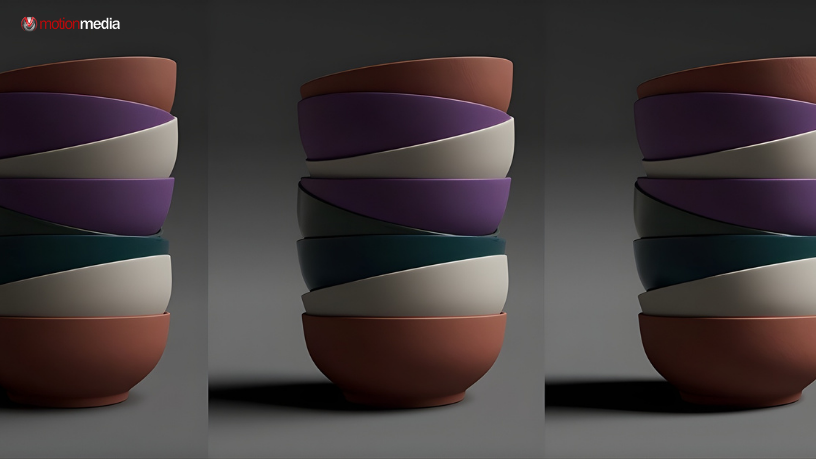
Not every software update needs flashy new tools to be valuable. Sometimes, the most impactful improvements are the ones that quietly remove friction from your everyday work.
HDR Light Studio 9 Drop 3 is exactly that kind of release.
This update focuses on smoothing daily lighting workflows, refining controls, and aligning the software more closely with how professional 3D artists, visualization specialists, and product renderers actually work. The result? Faster lighting decisions, fewer technical distractions, and a more intuitive experience across the board.
Whether you’re lighting product renders, automotive visuals, or high-end CGI scenes, Drop 3 delivers practical enhancements that add up over time.
One of the most significant workflow upgrades in HDR Light Studio 9 Drop 3 is Energy-Conserving Light Scaling.
Now, when you hold Shift while resizing a light in the Canvas or Render View, the software automatically adjusts the light’s intensity to maintain the same total energy output. This keeps your scene’s exposure consistent while you modify the light’s size.
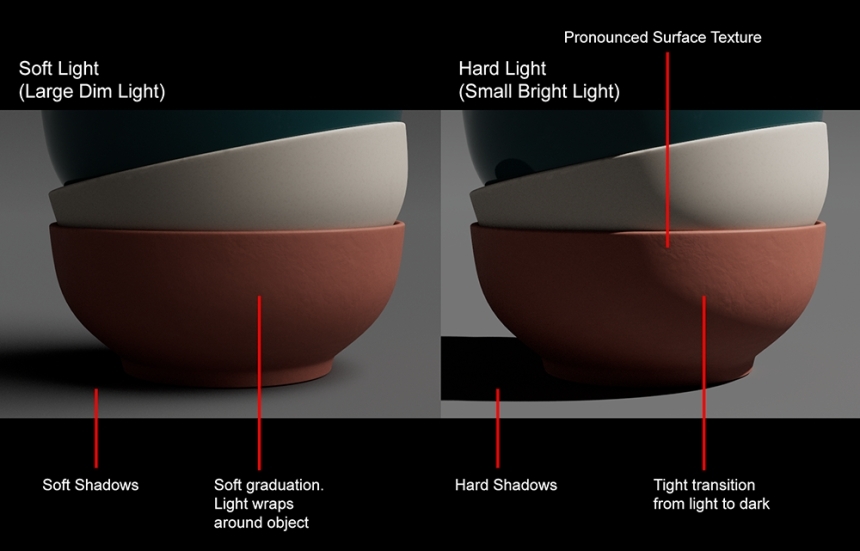
When lighting diffuse surfaces, artists constantly balance:
Traditionally, changing a light’s size meant readjusting brightness every time. Increase the light size to soften shadows, and your scene gets brighter. Make it smaller for crisper shadows, and illumination drops. This leads to repetitive adjustments that interrupt creative flow.
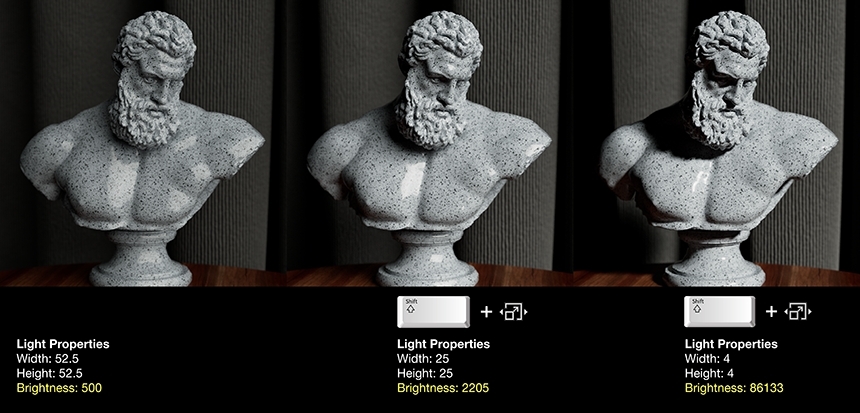
With energy-conserving scaling:
This allows you to focus purely on artistic intent, shadow quality, form definition, and realism while HDR Light Studio handles the technical compensation automatically.
For professionals working under tight deadlines, this feature alone can significantly reduce iteration time.
HDR Light Studio’s Blender plug-in now officially supports Blender 5, ensuring compatibility with the latest Blender workflows.
If Blender is central to your rendering pipeline, this update keeps your lighting setup stable, future-proof, and fully integrated with the newest Blender version without workarounds or legacy limitations.
Small usability improvements can have a big impact on speed and comfort.
The Project Menu now includes Open Recent Files, allowing quick access to recently saved HDi project files, ideal when switching between lighting variations or client revisions.
Navigation in the HDR Light Studio Render View has been refined:
If you use professional 3D software daily, these controls will feel immediately natural, reducing friction when moving between tools.
HDR Light Studio 9 Drop 3 aligns common shortcuts with industry conventions:
These changes reduce cognitive load and make transitions between applications smoother, especially in multi-software production environments.
Light names can now contain up to 63 characters, doubling the previous limit.
Instead of cryptic abbreviations, you can now use clear, descriptive names like:
“Rim Light Stage Left Warm Fill”
This is especially valuable for:
Better naming means faster scene navigation and fewer mistakes during revisions.
Under the hood, HDR Light Studio 9 Drop 3 updates to OpenColorIO 2.5.0, bringing support for:
This ensures your color pipeline remains aligned with current industry standards and integrates more reliably with modern rendering workflows.
Texture update performance has been optimized to eliminate unnecessary HDRI refreshes. This results in:
These performance gains may not be flashy, but they save valuable seconds repeated dozens of times per day.
The philosophy behind HDR Light Studio 9 Drop 3 is simple: professional lighting tools should support creativity, not slow it down.
This release doesn’t aim to reinvent lighting workflows. Instead, it refines them, removing small pain points that add up over time. The result is a lighting experience that feels faster, cleaner, and more intuitive the longer you use it.
Existing customers with active subscriptions can download HDR Light Studio 9 Drop 3 along with updated plug-ins directly from their account.
To review supported features and plug-in compatibility, refer to the official HDR Light Studio Compatibility Chart.
If you rely on HDR Light Studio for professional rendering, Drop 3 is a must-install update.
Download the latest version today and experience how small refinements can make a meaningful difference in your daily lighting work.
Update to HDR Light Studio 9 Drop 3 and streamline your lighting workflow now.
Share: